
Depending on your subscription, you will receive a given number of credits each month. At each monthly renewal all unused credits are lost and a fresh allotment of credits is credited to your account.
In addition and at any time an admin can purchase top-up credits. These credits have no expiry date and are used once your monthly credits are finished. To purchase a Top-up, click "Payments" in the left menu and open the "Manage" tab:
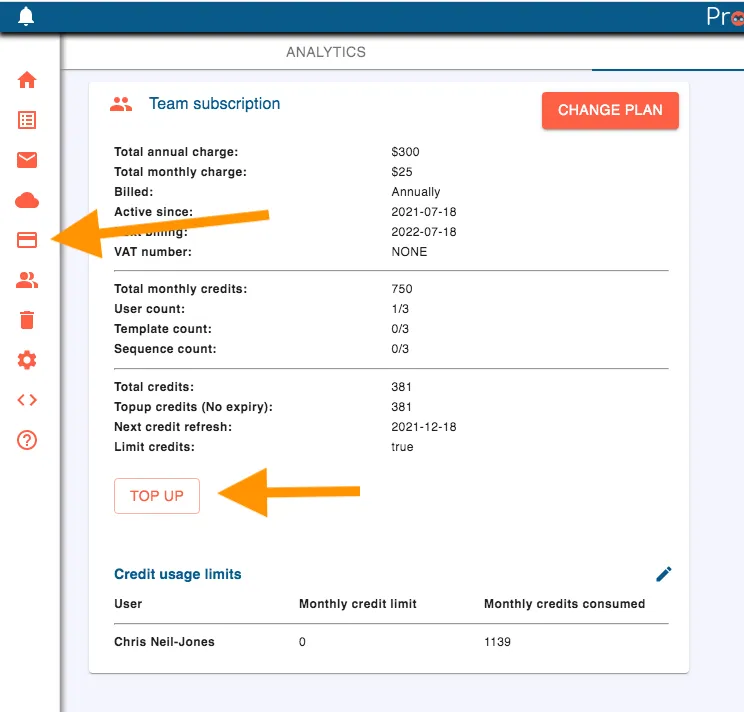
Click on the Payments icon, and then the Topup button
Now click the "Top up" button and pick how many packs you want (1 to 100). The popup shows the "Total Cost" and the "Credits"; "Confirm" opens the payment page.
You will have a series of options to choose from, depending on your subscription edition (credits cost more for the Free Edition).
You can see how many credits you have left, and when they renew, by clicking your workspace's name at the top right. The "Manage" tab shows "Total credits", "Topup credits (No expiry)" and "Next credit refresh", and the "Analytics" tab of Payments shows what your credits were spent on.